
Key Takeaways:
- Setting up DNI in CallRail correctly means your website’s static phone number gets replaced by a trackable number that ties every call back to the exact source, campaign, and session that drove it.
- DNI “breaks tracking” most often because of swap target errors, JavaScript conflicts, aggressive page caching, or number pools that are too small for your traffic.
- The safest setup follows a clear order: install the CallRail JavaScript snippet, define your swap targets, choose the right number pool size, then verify before you trust the data.
- Google Tag Manager is a reliable way to deploy DNI, but load order and caching mistakes can silently prevent numbers from swapping.
- Testing is not optional. Verifying DNI across multiple browsers, devices, and traffic sources is what separates a working setup from one that quietly loses attribution.
- If your traffic is high, spans multiple locations, or feeds paid campaigns, expert setup protects the accuracy of every downstream reporting and optimization decision.
Introduction
Setting up DNI in CallRail sounds simple until the day you notice your calls stopped attributing correctly, your website shows the wrong phone number, or a whole channel suddenly reports zero calls. Dynamic Number Insertion is one of the most powerful features in CallRail, but it is also one of the easiest to misconfigure in a way that quietly corrupts your data.
The frustrating part is that broken DNI rarely announces itself. Numbers still appear on the page. Calls still ring through. Everything looks fine on the surface while your attribution slowly falls apart underneath. By the time you catch it, you may have weeks of unreliable reporting and optimization decisions built on bad numbers.
This guide walks through exactly how DNI works, what “breaking tracking” actually means, and how to set it up the right way. You will learn the correct installation order, the mistakes that silently sabotage attribution, how to deploy DNI through Google Tag Manager, and how to verify everything is working before you rely on the data.
What is DNI in CallRail and Why It Matters
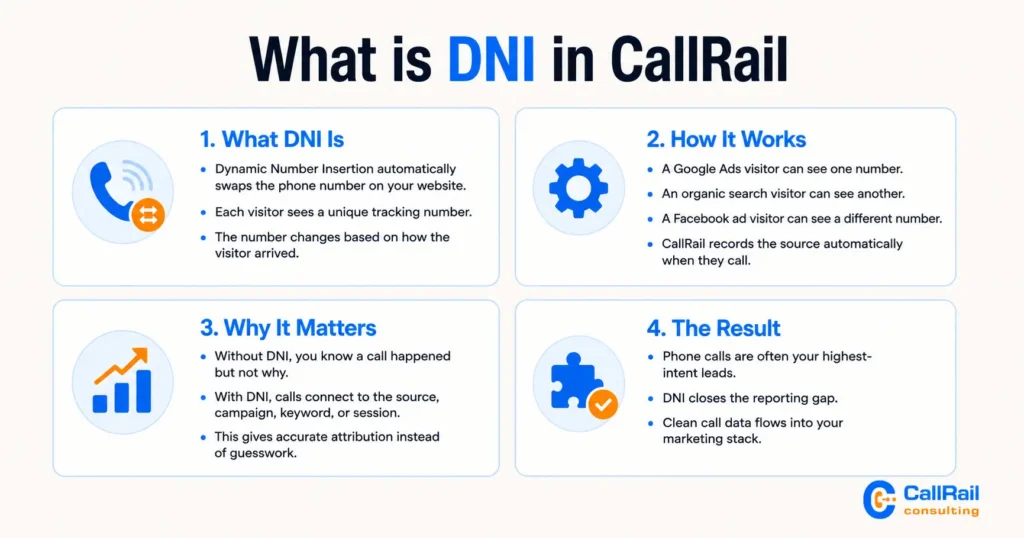
DNI, or Dynamic Number Insertion, is a CallRail feature that automatically replaces the static phone number on your website with a unique tracking number based on how each visitor arrived. That swap lets CallRail connect a phone call back to the traffic source, campaign, keyword, or session that produced it.

Without DNI, you know a call happened but not why. Every caller looks the same. With DNI in place, a visitor who came from a Google Ads campaign sees a different tracking number than someone who arrived from organic search or a Facebook ad. When they call, CallRail records the source automatically, giving you accurate attribution instead of guesswork.
This matters because phone calls are often your highest-intent leads, and treating them as untracked traffic leaves a large hole in your reporting. DNI closes that gap and feeds clean data into the rest of your marketing stack. For a broader view of how this fits into a full implementation, our CallRail setup and optimization guide covers the complete picture.
How Dynamic Number Insertion Actually Works
DNI works by running a small piece of JavaScript on your website. When a visitor loads a page, the script identifies your existing phone number, checks the visitor’s source and session details, and swaps in a tracking number tied to that context. The visitor never notices, but CallRail now has everything it needs to attribute the call.
The swap happens in the browser, in real time, on each page load. That is why the mechanics of how and when your pages load matter so much to whether DNI succeeds or fails.
Number Pools vs. Single Swap Numbers
CallRail offers two main approaches. A single swap number replaces your static number with one dedicated tracking number for a specific source, which works well for low-volume or single-channel tracking. A number pool assigns a group of tracking numbers so that individual visitors can be tracked at the session and keyword level, which is essential for accurate paid search and multi-source attribution.
Pools are more powerful but require enough numbers to cover your concurrent visitors. A pool that is too small forces CallRail to recycle numbers too quickly, which blurs attribution. Sizing the pool to your real traffic is one of the most overlooked parts of setup, and it comes up often when businesses explore the deeper features covered in our post on 8 hidden CallRail features most businesses miss.
Number Pools vs. Single Swap Numbers Side by Side
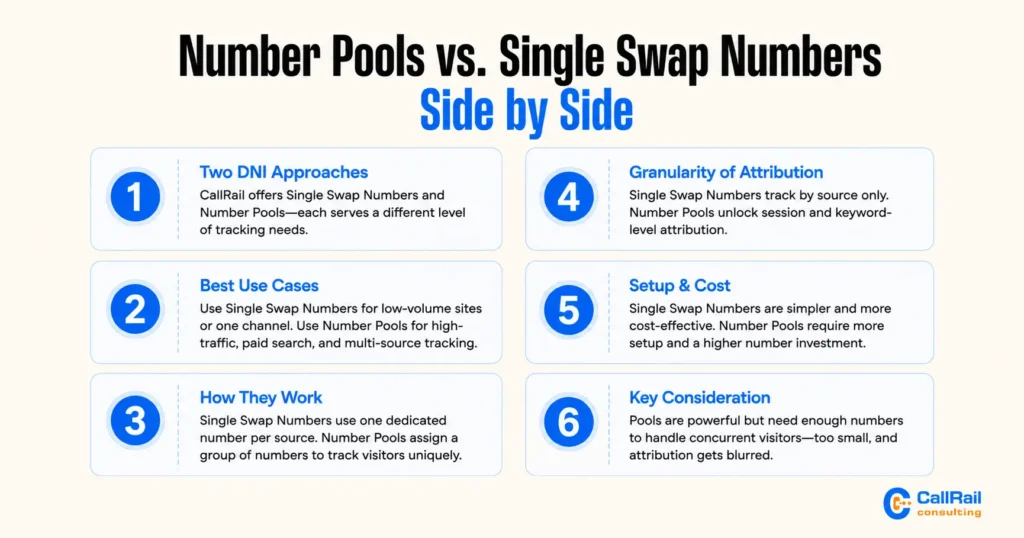
CallRail offers two main approaches to DNI, and choosing the right one determines how granular your attribution can be. A single swap number replaces your static number with one dedicated tracking number for a specific source, while a number pool assigns a group of numbers so visitors can be tracked at the session and keyword level.
Here is how the two compare side by side:
| Factor | Single Swap Number | Number Pool |
| Best for | Low-volume sites, single channel | High-traffic sites, paid search, multi-source tracking |
| Attribution level | Source only | Session and keyword level |
| Numbers required | One per source | Multiple, sized to concurrent visitors |
| Setup complexity | Low | Moderate to high |
| Keyword-level data | No | Yes |
| Cost | Lower | Higher (more numbers provisioned) |
| Risk if misconfigured | Missed swaps | Recycled numbers and blurred attribution |
| Ideal use case | Small local business, one campaign | Google Ads, multi-location, franchise tracking |
Pools are more powerful but require enough numbers to cover your concurrent visitors. A pool that is too small forces CallRail to recycle numbers too quickly, which blurs attribution. Sizing the pool to your real traffic is one of the most overlooked parts of setup, and it comes up often when businesses explore the deeper features covered in our post on 8 hidden CallRail features most businesses miss.
How the JavaScript Snippet Triggers the Swap
The CallRail snippet must load on every page where your phone number appears, and it needs to find the number in a format it can recognize. The script looks for the number in your page’s text and in tel: links, then replaces it. If the number is formatted inconsistently, hidden inside an image, or loaded after the script runs, the swap can fail even though the code is installed correctly.
What “Breaking Tracking” Really Means
Broken DNI usually does not throw an error. Instead, it fails in quiet ways that still let the page function while the data underneath becomes unreliable. Understanding these failure modes is what lets you prevent them.
Numbers That Never Swap
The most common break is a number that simply never gets replaced. Visitors see your static number, calls come in, but CallRail records nothing because the tracking number was never inserted. This often traces back to a formatting mismatch, a snippet that loads too late, or a caching layer serving a version of the page before the swap happened.
Attribution That Gets Overwritten or Lost
The subtler failure is when numbers swap but attribution is wrong. This happens when pools are undersized and numbers recycle before a caller dials, when multiple tracking scripts conflict, or when a page reload resets session data. The calls get counted but attributed to the wrong source, which is arguably worse than no data because it looks trustworthy. Keeping this data clean is the same discipline behind accurate CallRail form tracking and call attribution.
Step-by-Step: Setting Up DNI in CallRail the Right Way
Following the correct order prevents most problems before they start. Here is the reliable sequence.
- Confirm your tracking numbers and sources. Start by mapping every channel you want to attribute, such as organic search, Google Ads, Facebook, direct traffic, and offline campaigns. For each one, create the corresponding tracking numbers or number pools in your CallRail account.
Doing this first gives you a clear plan before any code touches your site, and it prevents the common problem of setting up swaps for sources you never actually defined.
- Choose single swap numbers or a pool. Match the method to the channel. Use single swap numbers when you only need to know the broad source, such as “this call came from Facebook.”
Use number pools when you need session-level and keyword-level detail, which is essential for paid search where you want to know the exact keyword or ad that drove the call. Many setups mix both: single numbers for simple channels and pools for high-value paid campaigns. - Size your number pool to real traffic. This is the step most people underestimate. Look at your analytics for peak concurrent visitors, not just monthly totals, since the pool has to cover everyone on the site at the same time.
Provision enough numbers so a tracking number is not reassigned to a new visitor before the previous one has finished their session and potentially called. Undersizing here is the single most common cause of scrambled attribution. - Install the CallRail JavaScript snippet. Place the snippet on every page where your phone number appears, not just the homepage. Landing pages, service pages, contact pages, and thank-you pages all need it.
Load it as early as practical in the page so the swap can happen before a visitor sees or taps the number. If you manage tags centrally, Google Tag Manager is a clean way to deploy it, which the next section covers in detail. - Standardize your phone number format. The script can only swap a number it can read. Make sure the static number is real, selectable text rather than an image, and that it is written consistently across every page.
Mixed formats, such as (555) 123-4567 on one page and 555-123-4567 on another, can cause partial swaps where some pages track and others do not. Pick one format and apply it everywhere, including inside tel: links. - Define your swap targets. Tell CallRail exactly which number to find and replace, matching the precise format used on your site. The swap target has to align with the on-page number character for character, so double-check spacing, parentheses, dashes, and country codes. A swap target that is even slightly off will look correct in your dashboard while quietly failing on the live page.
- Publish and clear caches. Once your changes are live, clear every layer of caching, including your CMS or plugin cache, server cache, and any CDN such as Cloudflare.
Caching is one of the most frequent reasons a correctly built DNI setup still shows the static number, because a cached page can be served to visitors before the swap script ever runs. Never assume the change is live until caches are cleared. - Verify before trusting the data. Do not treat installation as completion. Visit the site from different sources, confirm the number swaps on every key page, test on both desktop and mobile, and place a live call to check if it lands in CallRail with the right source attribution. Only after this verification should you start making reporting or optimization decisions based on the data.
Common DNI Setup Mistakes That Silently Break Tracking
These are the errors that pass a quick glance but quietly damage your attribution:
- Phone number stored as an image. The script cannot swap text it cannot read. Numbers must be real, selectable text.
- Inconsistent number formatting. Different formats across pages cause partial swaps. Standardize how the number is written everywhere.
- Snippet missing on key pages. Landing pages and thank-you pages often get forgotten, creating tracking blind spots.
- Undersized number pools. Too few numbers for your traffic forces recycling and scrambles attribution.
- Aggressive caching or CDN delivery. Cached pages can serve content before the swap runs, showing the static number.
- Conflicting scripts. Other tracking tools or duplicate snippets can interfere with the swap.
- No verification step. Assuming it works because the code is installed is the mistake that hides all the others.
Installing DNI Through Google Tag Manager
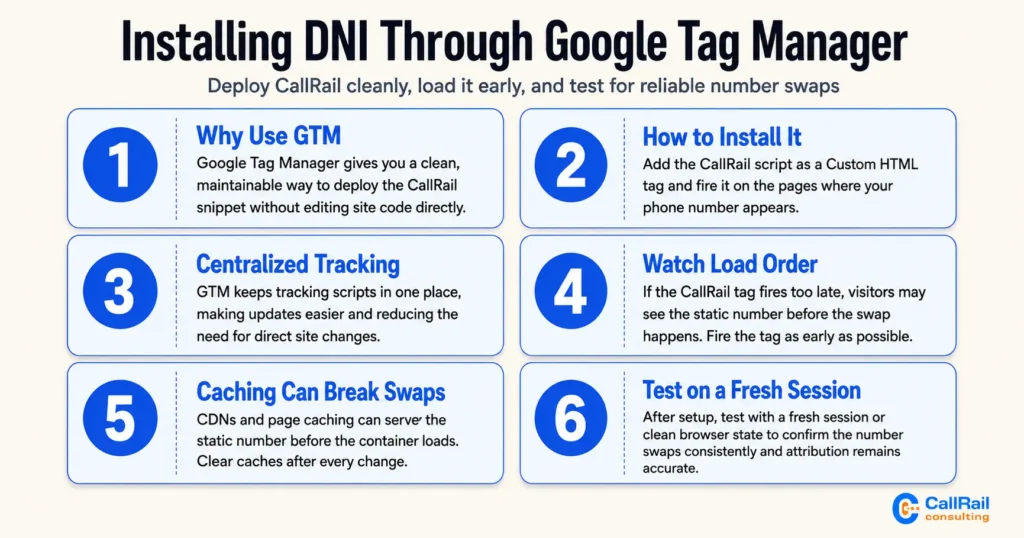
Google Tag Manager is a clean, maintainable way to deploy the CallRail snippet, especially if you already manage tags there. You add the CallRail script as a custom HTML tag and fire it on the pages where your number appears. GTM keeps your tracking centralized and easy to update without touching site code directly.
The catch is load order. If the CallRail tag fires too late, or after other scripts have finished rendering the page, the number may display before the swap can happen. Set the tag to fire on the appropriate trigger and as early as your setup allows, then confirm it runs consistently.
Caching deserves special attention with GTM deployments. If your site sits behind a CDN or uses page caching, a cached version can serve the static number before the container loads. Clearing caches after every change and testing on a fresh session avoids this trap. These same load-order and delivery details matter when DNI data feeds paid channels, which we cover in using CallRail to optimize Facebook Ads and offline ad spend.
How to Test and Verify DNI Is Working Correctly
Verification is the step that protects everything downstream, and it is the step most people skip. A working install proves itself under realistic conditions, not just a single desktop page view.
Start by visiting your site from different traffic sources. Click through from a Google search result, a paid ad, and a direct visit, then confirm each session shows a different tracking number where expected. Check that the number swaps on every important page, including landing pages and conversion pages, not just the homepage.
Test across multiple browsers and on mobile, since mobile click-to-call behavior and tel: links are common weak points. Place a live test call from one of the swapped numbers and confirm it appears in CallRail with the correct source attribution.
Finally, clear your cache and repeat from a fresh session to make sure caching is not hiding a problem. This level of rigor is exactly what keeps attribution reliable when tracking spans many sites, as in our guide to tracking franchise and multi-location leads with CallRail.
Get Expert Help Setting Up CallRail DNI
DNI setup is manageable for a straightforward, single-site situation, but the complexity climbs quickly with high traffic, multiple domains, paid campaigns, and layered caching. Small misconfigurations at that scale can cost you weeks of clean attribution before anyone notices.
If you want DNI configured correctly the first time, with pools sized to your traffic and verification built into the process, our team can handle the full implementation.
Explore our CallRail consulting services to see how we help businesses set up tracking that holds up under real conditions.
Book a CallRail DNI Setup Consultation
Every website, tech stack, and campaign mix is different, so the right DNI approach depends on your specific setup. A short conversation can save you from the trial-and-error that breaks tracking in the first place.
If you would like a specialist to review your goals and map out a reliable DNI configuration, book a CallRail consultation and we will help you get accurate call attribution in place.
Final Thoughts
Setting up DNI in CallRail without breaking tracking comes down to discipline more than difficulty. When you install the snippet correctly, format your numbers consistently, size your pools to your traffic, respect load order and caching, and verify across real sources and devices, DNI delivers exactly what it promises: accurate, source-level attribution for every phone call.
The businesses that struggle are almost always the ones that assume a working install because the code was in place. Treat verification as part of the setup, not an afterthought, and your call data becomes something you can actually build decisions on. Whether you configure it yourself or bring in help, a clean DNI setup is the foundation that makes the rest of your call tracking worth trusting.