

Managing lead sources across multiple business locations or franchises can become complicated quickly. Without the right system in place, you risk double-counting leads, inconsistent reporting, and a confused sales team. That’s where CallRail comes in. With its flexible and scalable platform, you can centralize lead tracking while still localizing efforts for individual franchises or locations.
Whether you’re running a multi-city law firm, a growing dental chain, or a marketing agency juggling clients in various zip codes, CallRail’s tools help you unify your approach while giving each location the independence it needs.
Why Multi-Location Businesses Need Better Call Tracking?
When you operate in multiple locations or manage multiple client accounts, lead tracking becomes a logistical challenge. You can’t always tell which ad campaign is driving results for which branch, or whether the local team followed up with a hot lead.
That lack of clarity causes revenue leaks and slows down your ability to scale. With CallRail’s multi-location features, you gain clear insight into which marketing sources work and which don’t, location by location.

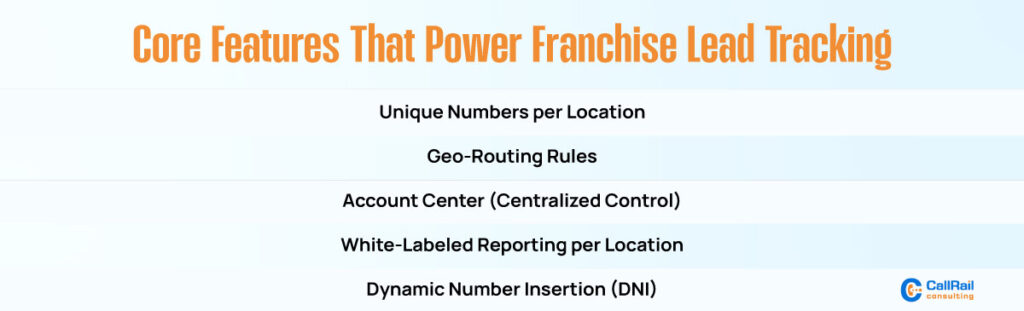
Assign Unique Tracking Numbers to Each Location
To start, the most effective setup involves assigning a unique call tracking number to each business location. This ensures that when a lead calls in, you instantly know which store, office, or team they’re trying to reach.
CallRail enables you to create local or toll-free numbers, allowing you to better align with the caller’s region. This helps build trust with local audiences while giving you the backend visibility to analyze lead volume and call quality by location.
Each number can be used in Google Ads, social media, direct mail, or on your website, ensuring accurate attribution across channels.
Set Geo-Routing Rules for Localized Lead Distribution
CallRail’s call routing capabilities are a game-changer for franchises and regional businesses. With geo-routing, you can automatically route incoming calls based on the caller’s location.
For instance, if someone calls from the Chicago area, the call can be directed to your Chicago sales or support team. If they’re calling from Dallas, they’ll go to your Dallas team. No need for manual transfers or confusion, just streamlined communication.
You can also set round-robin or sequential routing rules if multiple agents work within the same region. This enhances team productivity and ensures calls don’t fall through the cracks.
Leverage Account Center to Roll Up and Compare Data
One of CallRail’s most powerful tools for franchisees and agencies is the Account Center. It lets you manage multiple accounts for different locations or clients under a single login.
From one dashboard, you can:
- View call performance and lead source attribution by location.
- Compare data between different branches or franchises.
- Maintain visibility without micro-managing individual users or teams.
This centralized view saves time for agencies managing client accounts and franchise owners who need to monitor performance across their brand.
Enable White-Labeled Reports for Each Location
If you’re an agency managing marketing campaigns for multiple locations or a franchisor providing services to branches, white-labeled reporting is crucial.
CallRail enables customized, branded reports for each location. Each branch or partner only sees data relevant to them, maintaining privacy and data clarity. These reports can be automatically sent on a weekly or monthly basis, keeping teams informed without adding extra work to your plate.
This approach fosters better communication, enhances trust, and promotes transparency with both clients and franchisees.
Ideal Use Cases for Multi-Location Tracking
This type of setup works perfectly for:
Home services companies often have regional teams, such as those specializing in HVAC, plumbing, pest control, or roofing. Each crew can get routed leads specific to their service area.
Law firms with multiple office locations. Leads can be routed by practice area and geography, with detailed reporting at both the local and firm-wide level.
Dental and medical chains with clinics across cities. Offices can track appointment calls, patient inquiries, and marketing ROI separately but view trends together.
Marketing agencies manage multiple client accounts. CallRail offers clear, client-level call tracking with no data overlap.
Track Leads from Every Source with Dynamic Number Insertion
Dynamic Number Insertion (DNI) is a powerful feature in CallRail that automatically inserts phone numbers on your website based on the visitor’s source, such as Google Ads, SEO, or Facebook campaigns.
This helps franchises and agencies accurately measure campaign performance without needing dozens of different landing pages. Each visitor sees a number tied to their entry source, and you gain visibility into which marketing strategy is truly paying off.
Unify Local Data Into a Global Strategy

While each location needs to operate semi-independently, the brand-wide strategy should still be data-driven. With CallRail’s reporting tools and integration options, you can pull together all local lead data to see the big picture.
Final Thoughts
Managing multiple locations or client accounts doesn’t have to result in scattered data, missed opportunities, or inconsistent reporting. With CallRail, you gain the tools to centralize lead tracking while still empowering each location to operate independently. From unique tracking numbers and geo-routing to dynamic number insertion and white-labeled reports, the platform ensures accurate attribution and streamlined communication. This balance between local control and global visibility allows you to make smarter marketing decisions, improve team accountability, and scale with confidence. Ultimately, CallRail helps transform complex multi-location operations into a clear, data-driven growth strategy that maximizes every lead.