
Not every phone call is a qualified lead. Some are sales-ready, while others are just casual inquiries or spam. If your team treats every call the same, you waste time and miss opportunities to increase revenue. That’s where CallRail’s Lead Center steps in. Designed to help you organize, route, and score leads like a true sales platform, Lead Center makes sure your most valuable prospects never slip through the cracks.
Instead of waiting to qualify leads in your CRM, you can score and prioritize them in real time based on powerful call tracking data and caller behavior.
Why Lead Scoring Matters for Call-Based Leads?
Lead scoring is the process of assigning a value to incoming leads based on their likelihood of converting into customers. When it comes to calls, traditional marketing tools often miss the nuance. A five-minute call from a new prospect should not be treated the same as a 20-second spam call.
With Lead Center, you can apply real-world sales context to each interaction by evaluating key intent signals and assigning scores accordingly. This ensures:

- Sales reps spend more time with the right leads
- Follow-ups are prioritized by value
- No hot lead gets ignored or delayed
- You shorten the time between call and conversion
Top Lead Scoring Signals You Can Track with CallRail
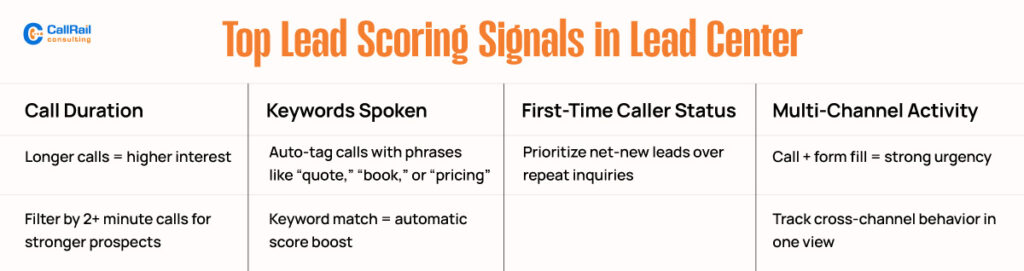
To accurately score leads, focus on a few high-impact signals that indicate purchase intent and readiness. Here are the most effective data points Lead Center offers.
1. Call Duration
Call length is a quick indicator of interest. Calls longer than one or two minutes often represent real engagement. A caller who asks questions or stays on the line longer is usually more serious than someone who hangs up quickly.
You can use Lead Center filters to highlight long calls, helping your team focus their follow-up efforts.
2. Keywords Used During the Call
With CallRail’s Conversation Intelligence, you can analyze what words were spoken on the call. When someone uses terms like “book,” “pricing,” “schedule,” or “quote,” it’s a strong signal of interest. These keywords can be automatically detected and tagged for easier identification of leads.
Use this to bump up the score of leads who mention buying actions or services.
3. First-Time Caller Status
First-time callers are often new prospects, which makes them more valuable than repeat callers asking for updates. Lead Center automatically flags whether a call is from a new or returning contact, so you can prioritize those who represent new opportunities.
Over time, this helps identify how well your campaigns are driving net-new business.
4. Combined Call and Form Activity
When a lead both calls and submits a form, it shows multi-channel intent. That’s a sign of urgency or high interest. Lead Center ties form fills and calls together using cookies and session tracking, helping you spot these high-value leads at a glance.
Tag these contacts for priority outreach or add them to your hot leads list for immediate action.
Lead Center Features That Support Scoring and Prioritization
Lead Center does more than just display call activity. It consolidates everything into a centralized inbound lead inbox, where you can manage, assign, and qualify leads across calls, texts, and forms, all in real-time.
Inbound Lead Inbox
This is your command center. Every lead that comes in, regardless of the channel, appears here with key data, including caller ID, source, keyword match, and past interactions. You can use this hub to quickly score leads and assign them to the right team member.
Call Notes and Disposition Tagging
After each interaction, agents can leave notes, select a call outcome (such as qualified, spam, or follow-up), and apply disposition tags. These tags are fully customizable, allowing your team to create a repeatable lead scoring framework.
Over time, tagged call data becomes a goldmine for performance analysis and campaign tuning.
Team-Level Call Routing and Assignment
Once a lead is identified as high-priority, it can be routed to specific agents or departments based on your rules. Lead Center allows routing by location, keyword, campaign source, or agent availability.
This helps move hot leads from contact to conversion more quickly and with fewer handoffs.
Source, Campaign, and Rep Filters
You can slice and dice leads using filters such as the original traffic source (e.g., Google Ads, Facebook, SEO), campaign name, or even the rep who answered the call. This lets you compare lead quality across channels and team members.
Better visibility leads to more informed decisions about where to allocate your marketing dollars and training resources.
Use Lead Center as a Pre-CRM for Speed and Simplicity
Sometimes your sales team needs to move quickly. CRMs are powerful, but not always built for speed. Lead Center serves as a pre-CRM, helping your team qualify and score leads before they hit your formal pipeline.
From the moment a call comes in, you can:
- View contact history
- See lead source and score
- Assign ownership
- Schedule follow-ups
- Add notes for the next touchpoint
Then, once qualified, the lead can be pushed to your CRM using CallRail’s integrations with HubSpot, Salesforce, Zoho, or via Zapier.
Best Practices for Scoring Leads in Lead Center
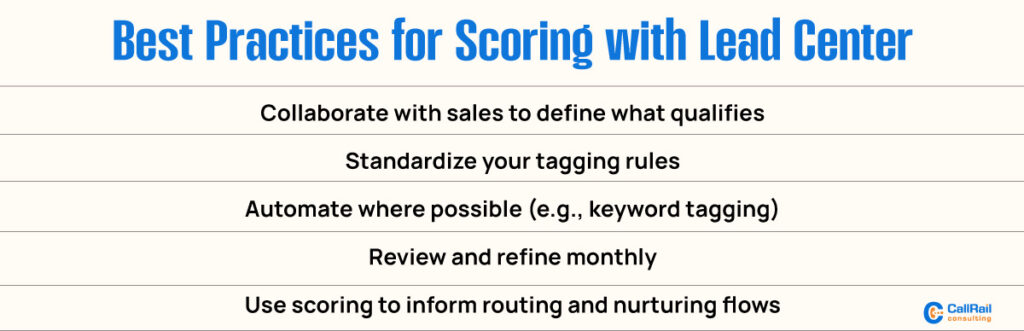
To achieve consistent results, follow a simple and repeatable lead scoring framework. Here’s how to get started:
1. Define What Makes a Good Lead
Collaborate with your sales team to determine the key attributes of a qualified lead, including duration, first-touch source, keyword usage, and other relevant factors.
2. Set Tagging Guidelines
Use uniform tags across all agents to ensure your data remains clean and meaningful. For example, use “hot,” “warm,” or “not qualified” as standard dispositions.
3. Use Automation When Possible
Utilize keyword spotting and source-based filters to automatically assign preliminary scores. Then have reps confirm or adjust as needed.
4. Monitor and Improve
Review scoring results monthly. Are high-score leads closing? Are low-score leads ignored? But converting later? Use that data to refine your scoring logic.
Score Smarter, Close Faster with CallRail’s Lead Center
Lead scoring isn’t just for web leads or CRMs anymore. With CallRail’s Lead Center, your team can evaluate and prioritize phone leads in real time. By combining call data, keywords, caller history, and multi-channel behavior, you get a clear picture of who’s ready to buy and who needs more nurturing.
When you stop treating all calls equally, you start working smarter. That means faster sales cycles, better customer experiences, and higher close rates.
Lead Center turns your call data into a sales asset. Use it to qualify leads with confidence and close more of them.