

Phone calls might be your top conversion path, but they’re far from the only one. In today’s digital marketing landscape, form submissions play a crucial role in capturing qualified leads, especially for service-based businesses, SaaS companies, and agencies. That’s why CallRail’s form tracking and form attribution features are essential tools for understanding and optimizing your entire inbound funnel.
By combining both form and call tracking, CallRail provides marketers with full-funnel visibility, helps connect the dots between different customer touchpoints, and ensures that leads are attributed to the right campaigns.
What is CallRail Form Tracking and Why Does it Matter?
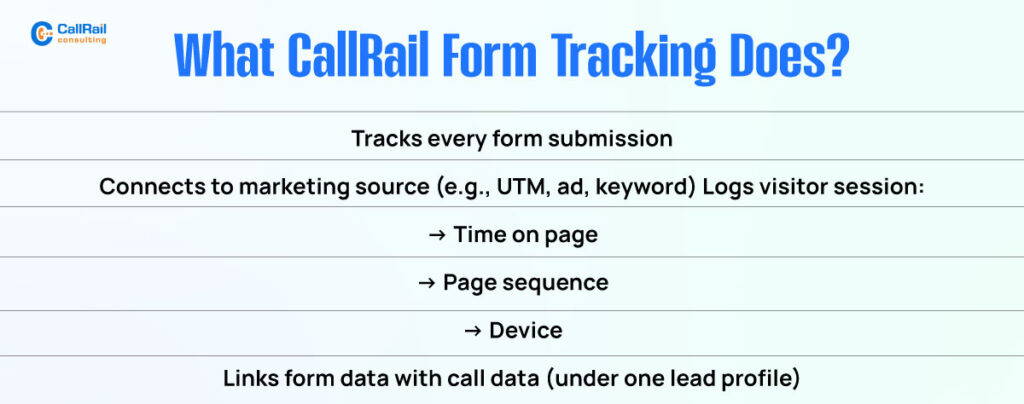
CallRail’s form tracking allows you to monitor every form submission on your website with the same depth of attribution that you get from calls. This means your contact forms, quote requests, scheduling tools, and lead capture fields are all tracked, timestamped, and linked to a visitor’s marketing source.
This feature helps you answer critical questions like:

- Which campaign brought in the lead who filled out the form?
- Did they interact with a Facebook ad, a Google search, or an email before submitting?
- Are they a first-time visitor or returning user?
- Did they call first, then submit the form, or vice versa?
Form tracking reveals user intent and helps map the customer journey so you’re not left guessing how your leads engage with your brand.
How CallRail Form Tracking Works Behind the Scenes?
When a visitor lands on your site, CallRail assigns them a unique identifier using browser cookies. These cookies track the session across multiple pages. With Dynamic Number Insertion (DNI) already in place for call tracking, the same visitor ID is also applied to forms.
When they submit a form, CallRail captures the form data and ties it to the source of the visit, whether that’s Google Ads, Bing, Facebook, organic search, or a UTM-tagged campaign.
That form submission is then stored and viewable in CallRail alongside call records, helping you see all actions from that lead in one timeline.
Attribution Accuracy: Calls and Forms Under One Roof
Marketers often struggle with siloed data between form submissions and phone calls. CallRail addresses this by displaying both conversion types associated with the same visitor session.
For example, a visitor might call first and then submit a quote request later. Or they may start filling out a form, abandon it, and call instead. With CallRail, you can view this multi-touch behavior and attribute credit accurately.
You’ll know:
- Which conversion path had the strongest intent
- Whether your forms are supporting or replacing calls
- How visitors interact before they reach out
This clarity allows better optimization of your landing pages, ad creatives, and funnel stages.
Integrating Form Tracking with Your CRM and Marketing Tools
When CallRail form tracking is connected with your CRM, such as HubSpot, Salesforce, or Zoho, it automatically syncs form data with call logs under a single contact record. This means no duplicate entries, no broken tracking, and no lost lead insights.
Once a form is submitted:
- The lead is created or updated in the CRM
- The source, medium, and campaign are passed along
- Notes from the form can be mapped to fields in your CRM
- Automation rules can trigger follow-up emails, tasks, or lead scoring
This unified view provides your sales team with more context, making follow-up more personal and timely.
Top Use Cases for CallRail’s Form Tracking
CallRail’s form tracking isn’t just a convenience feature. It drives smarter decisions. Here’s how marketers and agencies are using it.
1. Understanding First Touch vs Last Touch Attribution
Sometimes a lead will fill out a form only after interacting with your site several times. CallRail allows you to see if a form fill was their first or final action. You can prioritize marketing dollars on campaigns that generate first-touch form submissions, indicating strong initial interest.
2. Comparing Call-First vs Form-First Leads
With unified session tracking, you can determine whether a user called or submitted a form first. This helps you identify which touchpoint creates more urgency or higher conversion rates for your specific audience.
3. Catching Leads Who Abandon the Call Flow
Not everyone wants to talk. Some users might click your phone number, hesitate, and ultimately submit a form instead. CallRail can link those actions so you still capture the lead even if they don’t complete the call.
4. Measuring Channel-Specific Form Conversions
Track which channels or campaigns are driving form conversions. You may discover that Google Ads drives more calls while organic search delivers more form submissions. This can help you balance your strategy and fine-tune your message for each channel.
Combining Forms and Calls for Full-Funnel Inbound Clarity
By tracking both calls and forms in a single platform, you gain a comprehensive view of how leads engage with your business. You no longer have to guess where leads come from or split tracking between different tools.
This 360-degree lead visibility helps:
- Improve attribution accuracy
- Strengthen campaign reporting
- Refine your messaging based on preferred contact methods
- Deliver a better customer experience
Whether you’re an agency reporting performance or a business fine-tuning ad spend, this level of insight is crucial.
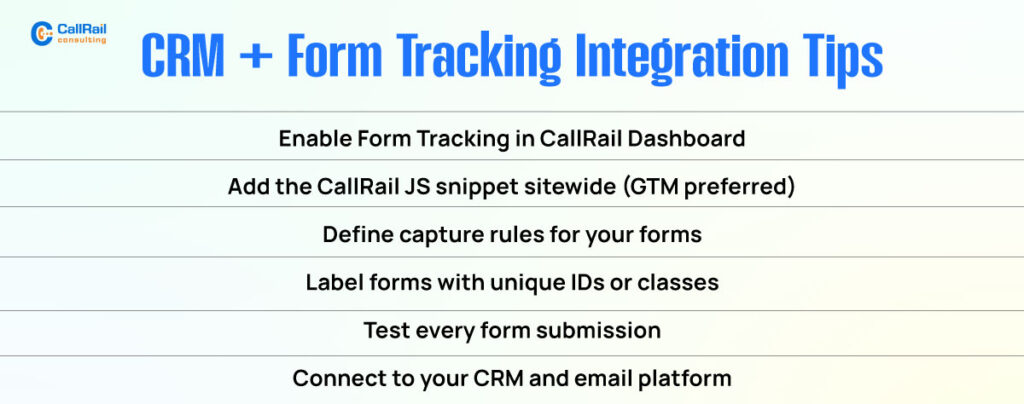
Tips to Set Up Form Tracking in CallRail
To enable form tracking:
- Activate the Form Tracking feature in your CallRail dashboard
- Install the JavaScript snippet on your site, ideally via Google Tag Manager
- Use CallRail’s form capture rules to specify which forms you want to track
- Test the setup to ensure all submission data is being pulled in properly
- Link your form tracking to your CRM and email automation systems
Ensure your forms are clearly labeled with unique IDs or classes to help CallRail detect and differentiate them.
Maximize Lead Intelligence with CallRail Form Tracking
CallRail’s form tracking feature transforms how you understand your inbound funnel. It helps you capture every conversion, whether it’s a call, a form, or both. By attributing leads to their true sources and syncing all activity under one contact, you gain deeper insights and make smarter marketing decisions.
If you’re relying on call tracking alone, you’re only seeing half the story. Add form tracking into the mix, and you’ll finally get the full picture of your lead generation strategy and campaign performance.