


Most CallRail users barely scratch the surface of what the platform can do. They set up a few tracking numbers, watch call volume reports, and call it a day. Meanwhile, the real power sits buried inside menus, dashboards, and integrations that quietly transform how marketing teams attribute revenue, qualify leads, and optimize campaigns. If you’ve been treating CallRail as a basic call tracking tool, you’re leaving serious performance gains on the table.
This guide walks through the underused features that experienced marketers, agencies, and revenue-driven businesses tap into to extract maximum value from their CallRail subscription. Whether you run paid search, manage multi-location service brands, or oversee an inbound sales engine, these capabilities can sharpen your attribution, tighten your follow-up, and reveal conversion paths you didn’t know existed.
Why Most Businesses Underuse CallRail
CallRail’s interface looks deceptively simple. Tracking numbers, call logs, source attribution the basics are obvious. But the platform has matured into a full conversation intelligence and lead management suite, and the average user never touches 70 percent of what they’re paying for.
The pattern is consistent across industries. Businesses sign up to solve one specific problem, configure the minimum needed, and never revisit the settings. Meanwhile, CallRail keeps shipping features in areas like AI-powered call analysis, form tracking, multi-touch attribution, and CRM workflow automation. The gap between basic users and power users keeps widening, and that gap directly translates into wasted ad spend, missed leads, and weaker pipeline visibility.

Conversation Intelligence and AI-Powered Call Analysis
The first feature most users overlook is Conversation Intelligence, CallRail’s AI layer that listens to every call, transcribes it, and surfaces actionable insights automatically. Instead of relying on staff to manually tag calls or guess which leads were qualified, the system does the heavy lifting in the background.
Conversation Intelligence powers automatic call transcription with high accuracy, keyword spotting that flags mentions of specific products, competitors, or objection language, and sentiment analysis that scores how positive or negative each conversation was. For marketing teams, this means you can finally connect ad campaigns to actual conversation quality, not just call volume. You can also build keyword-triggered automations that route high-intent calls differently, alert sales managers when a competitor’s name comes up, or auto-tag conversations for training and QA.
The real win here is unlocking qualitative data at scale. A team running 500 calls a month can’t realistically listen to all of them, but Conversation Intelligence reads every transcript and organizes the insights so you can spot trends across hundreds of conversations in minutes.
Want Help Unlocking the Full Power of Your CallRail Account?
Most businesses don’t need more features, they need an expert to configure the ones they already have. At CallRail Consulting, we audit your current setup, identify the high-impact features sitting unused in your account, and build out the configurations, integrations, and reporting structures that actually move the pipeline. If your CallRail subscription feels like it’s underperforming, the issue is almost always configuration, not capability.
Get a CallRail audit from our team and turn your account into the revenue intelligence engine it was designed to be.
Lead Center and Unified Inbox Workflows
Most CallRail accounts never enable Lead Center, even though it consolidates calls, texts, and form submissions into one shared inbox that any team member can manage from a browser or mobile device. If your business juggles inbound leads across multiple channels, this single feature can replace several tools and eliminate the “who’s handling this lead” confusion that costs deals.
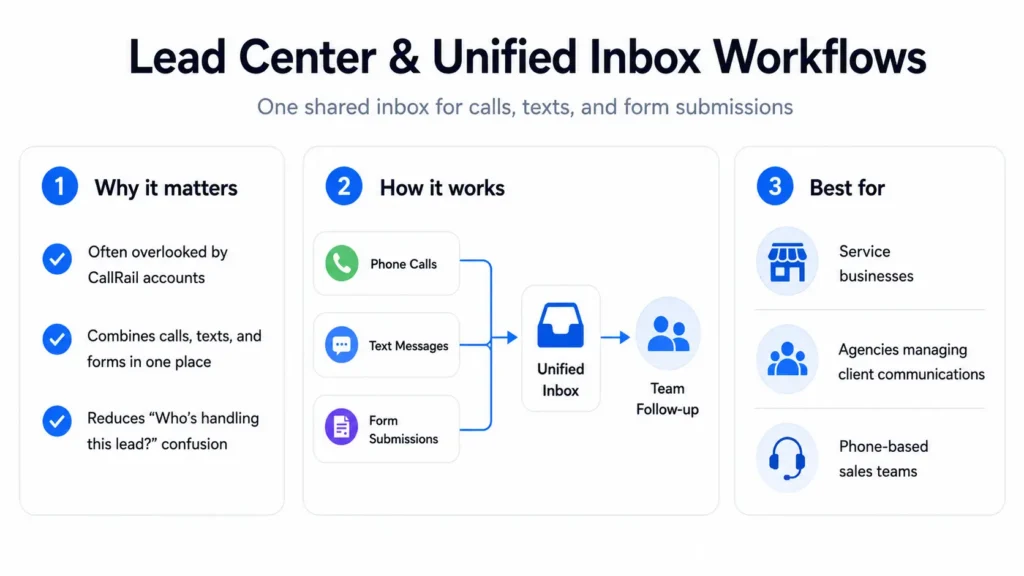
Lead Center supports two-way texting from your tracking numbers, real-time notifications when leads come in, internal notes that travel with each conversation, and team assignment so leads get routed to the right rep instantly. For service businesses, agencies handling client communications, and sales teams that work leads from a phone, Lead Center turns CallRail from a reporting tool into an actual workflow hub.
Form Tracking with Full Attribution
Calls aren’t the only conversions worth tracking, and CallRail’s form tracking capability often goes completely unused. The platform can capture form submissions from your website and attribute each one to the exact marketing source that drove the visitor, including paid keywords, organic search terms, referring domains, and UTM-tagged campaigns.
What makes this powerful is the unified view. Instead of running separate analytics for calls and forms, you get a single attribution model that shows which channels actually drive conversions in any format. You can also set up conditional routing, automated email responses, and CRM integrations that fire the moment someone submits, creating a faster lead response cycle than most native form builders allow.
Multi-Touch Attribution and the Full Visitor Journey
Last-click attribution lies, and most CallRail users still rely on it without realizing the platform supports much richer models. CallRail tracks the complete visitor journey across multiple sessions and devices, capturing every marketing touchpoint that contributed to a conversion rather than crediting only the final click before the call.
The visitor timeline shows you the entire path: first organic visit from a blog post three weeks ago, a paid social click last week, a direct return visit yesterday, and the call this morning. For brands with longer consideration cycles, home services with multiple research sessions, or B2B funnels with many touches, this changes how you evaluate campaign performance. Channels that look weak under last-click often deserve credit as influential drivers, and CallRail’s multi-touch view makes that visibility possible.
Dynamic Number Insertion at Scale
Most users set up a handful of static tracking numbers and stop there. Dynamic Number Insertion (DNI) does something fundamentally different: it swaps the phone number on your website automatically based on how each visitor arrived, so every traffic source gets its own unique number without you creating hundreds manually.
A visitor from Google Ads sees one number. A visitor from organic search sees another. A visitor from a specific Facebook campaign sees a third. All without changing your site’s code beyond a single snippet. This unlocks granular attribution down to the keyword, campaign, or referrer level, and it scales with your marketing complexity. The advanced configuration options like number pools, swap conditions, and session-based persistence are where the real precision lives, and most accounts never go past the default setup.
Custom Integrations and Webhooks
CallRail’s native integrations with Google Ads, Google Analytics, HubSpot, Salesforce, and the rest of the marketing stack cover the obvious use cases. The hidden power is the webhook system and open API, which let you push call data into virtually any tool, trigger custom automations, and build workflows tailored to your specific business logic.
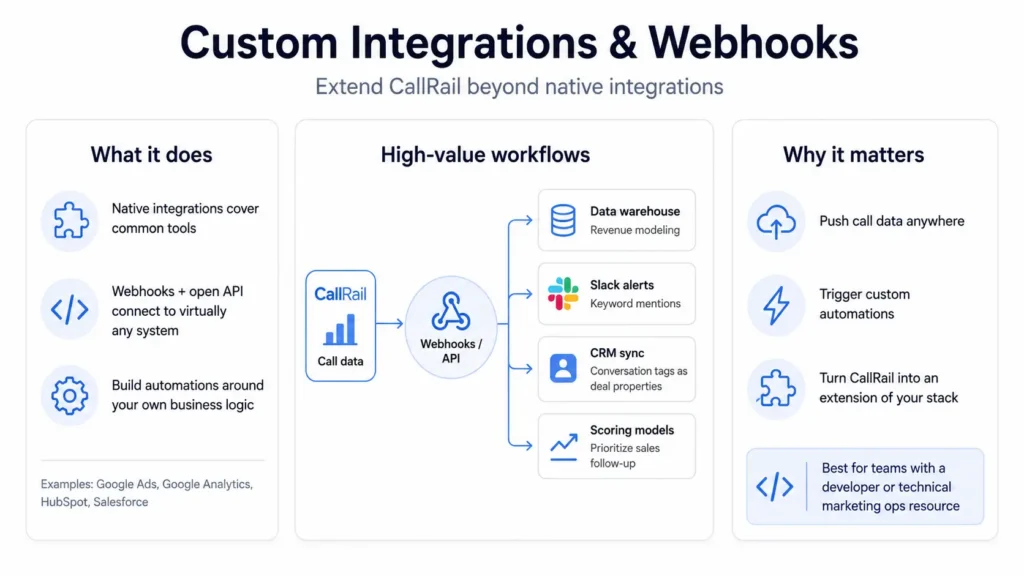
Common high-value setups include sending qualified call data to a custom data warehouse for revenue modeling, triggering Slack alerts when high-value keywords get mentioned, syncing Conversation Intelligence tags into your CRM as deal properties, and routing calls into custom scoring models that prioritize sales follow-up. If you have a developer or a technical marketing operations resource, the webhook layer is where CallRail stops being a vendor tool and becomes an extension of your stack.
Advanced Reporting and Custom Dashboards
The default CallRail reports answer basic questions. The custom reporting features answer the questions that actually move budget decisions. You can build dashboards by client, campaign, location, or any custom segment, schedule automated reports to stakeholders, and export structured data for deeper analysis in BI tools.
Multi-location businesses especially benefit from this. A franchise marketing team can build location-level performance dashboards that surface which markets are converting, which need optimization, and where spend should shift. Agencies can produce client-ready reports automatically instead of manually rebuilding them every month. The reporting engine is one of the most extensible parts of the platform, and almost no one uses it past the standard views.
Ready to Build a CallRail Setup That Drives Real ROI?
Whether you’re running a single business, managing multiple locations, or operating an agency that serves clients, your CallRail implementation should be working harder than it currently is. Our consulting team specializes in advanced CallRail configurations Conversation Intelligence rollouts, multi-touch attribution modeling, CRM integrations, and custom reporting that connects calls to actual revenue. Schedule a strategy call and see what a properly tuned CallRail account looks like in your business.