


Your phone leads deserve more than just a missed call notification. In the same way that form submissions trigger email workflows, your phone calls, especially the missed ones, should spark personalized, automated follow-ups. Integrating CallRail with marketing automation platforms like ActiveCampaign, Klaviyo, or Mailchimp gives your phone leads the attention they deserve and helps convert more of them into loyal customers.
By connecting your call tracking platform with your email marketing tools, you can build more effective customer journeys, respond more quickly, and turn every inbound call into a lifecycle marketing opportunity.
Why Automate Follow-Ups for Phone Leads?
Most businesses put their form leads into nurturing sequences but completely ignore their call activity. That’s a massive missed opportunity. Calls show high intent. Whether it’s a service request, sales inquiry, or product question, people who take the time to call are often ready to act.
However, if no one answers or the conversation ends without a sale, those leads can quickly go cold. Marketing automation ensures you stay connected. With the right integration, every call event missed, answered, or voicemail can be the start of a personalized follow-up journey.

Powerful Automation Workflows You Can Trigger with CallRail
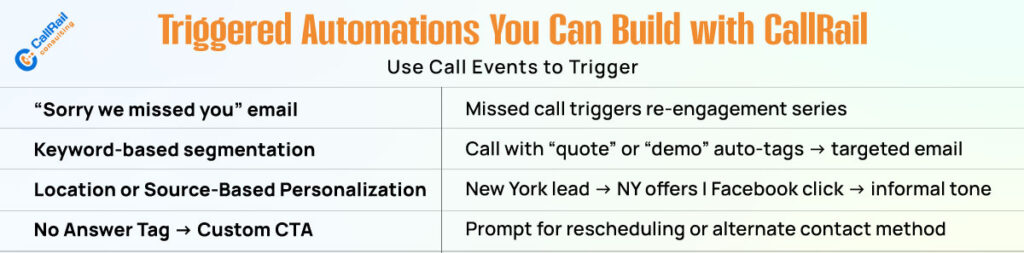
Once integrated, you can create rich, personalized workflows based on call data. Here are a few high-impact automations you can set up using ActiveCampaign, Klaviyo, or Mailchimp.
1. Add Missed Calls to a Retargeting Sequence
If a call goes unanswered, don’t let the lead slip away. Automatically enroll them into a nurturing email series that includes helpful content, offers, or scheduling links. Include a line like “Sorry, we missed your call” to re-engage them with context.
This increases the chance of rebooking the lead without relying on manual follow-up.
2. Segment by Call Topic or Keyword
CallRail’s keyword spotting and conversation intelligence allow you to tag calls by topic or intent. For example, if someone mentioned “pricing,” “demo,” or “support,” you can send them emails tailored to those needs.
By segmenting leads by their intent, you make your marketing smarter and more relevant.
3. Personalize Drip Campaigns Based on Location or Source
CallRail captures the caller’s location and the original traffic source. You can use that data in your automation platform to customize messaging. Leads from New York might receive location-specific offers. Those from Facebook ads might get shorter, more casual messaging than SEO leads.
Personalization like this improves engagement and builds trust.
4. Tag “No Answer” Leads for Follow-Up or a New CTA
When a call isn’t answered, you can tag it in CallRail as “no answer” and push that tag to your email platform. That lead can then receive a unique CTA, such as “Schedule a Callback” or “Request Info by Email.”
This simple follow-up often reactivates prospects that would have otherwise been lost.
Use Zapier to Bridge the Integration Gap
If your email platform doesn’t have a native CallRail integration, Zapier is your go-to connector. With Zapier, you can:
- Trigger automations from specific call events (e.g., missed calls, voicemails, or tagged calls)
- Pass custom fields like call source, campaign, and duration into your marketing tool
- Create new contacts or update existing ones in ActiveCampaign, Klaviyo, or Mailchimp
The flexibility of Zapier allows you to treat call data like any other lead source in your automation workflows.
Send Event-Based Email Campaigns That Feel Timely and Relevant
Instead of blasting generic follow-ups, use event-based triggers like:
- “You called us 3 days ago and we missed you—can we help?”
- “Thanks for your recent call—here’s a quick summary of our services.”
- “We noticed you asked about pricing—here’s our latest offer.”
These time-sensitive emails feel human, helpful, and responsive. They bridge the gap between sales and marketing while nudging leads toward the next step.
Best Practices for Using Call Data in Lifecycle Marketing
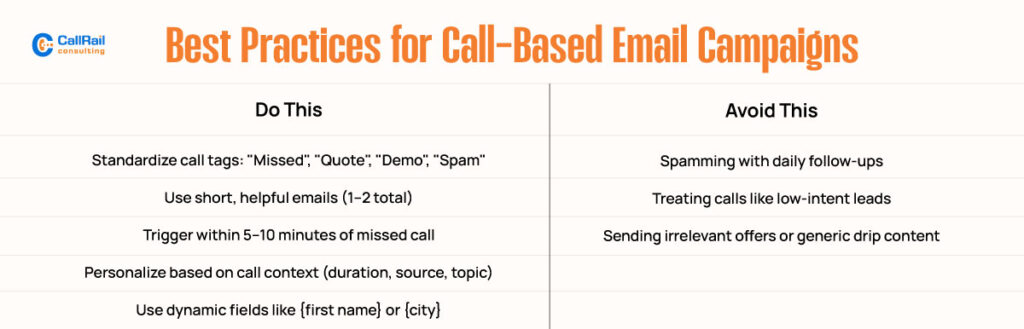
To make the most of your CallRail integration, follow these best practices:
Standardize Call Tags: Use consistent tags across your team to reliably trigger automation based on call outcomes or topics.
Avoid Over-Automating: Keep your automations focused on helping, not spamming. One or two relevant emails after a missed call are usually enough.
Sync with CRM: If your marketing platform integrates with a CRM like Salesforce or HubSpot, sync calls data there as well so your sales team has full context.
Use Lead Scoring: Combine call actions, form fills, site visits, and email clicks to build a comprehensive lead profile. Adjust your follow-up strategy based on the level of engagement.
Test and Iterate: Utilize A/B testing in your email platform to experiment with subject lines, messaging, and timing for your call-based campaigns.
Email Platform Highlights: What Each One Offers?
Here’s how the major email platforms handle CallRail integrations:
ActiveCampaign
Known for advanced automation, ActiveCampaign allows deep customization of workflows. With Zapier, you can add leads to sequences based on call outcomes, keywords, or sources. You can also tag contacts, assign lead scores, and trigger conditional follow-ups based on email or call behavior.
Klaviyo
Great for eCommerce and DTC brands, Klaviyo works well when you want to tie call data to product interest or customer journey milestones. Trigger abandoned call flows, post-call coupon offers, or region-based content with ease.
Mailchimp
Ideal for simpler setups, Mailchimp works best for missed-call follow-ups and basic drip campaigns. You can push new contacts from CallRail into a list and send them a one-time email or basic automation without complex logic.
Give Call Leads the Same Nurture Love as Form Fills
Most businesses have structured follow-ups for form submissions, but few have similar systems in place for calls. That’s a big mistake. Call leads are often more qualified and closer to making a decision. By incorporating them into your lifecycle marketing strategy, you ensure that no opportunity is wasted.
Call data isn’t just useful for attribution. It’s gold for segmentation, personalization, and conversion.
Turn Every Call into a Conversion Opportunity
Integrating CallRail with email marketing tools like ActiveCampaign, Klaviyo, or Mailchimp lets you automate what would otherwise be lost opportunities. Every missed call, every voicemail, every sales inquiry now becomes a moment to engage, educate, and convert.
Whether you’re using a native integration or Zapier, the result is the same: faster follow-ups, smarter segmentation, and more consistent revenue from phone leads.
Don’t let form fills get all the love. With the right automation setup, your call data can fuel lifecycle campaigns that build relationships and close more deals.